A few years ago I wanted to build a personal website. A portfolio site: one page, some text, a few images, and a contact form. The kind of thing that should take an afternoon.
The contact form is where it broke down.
A contact form needs something to process the submission. That means backend code, which means I can no longer just host static files. The alternative is signing up for a third-party form service. For a single form on a personal site.
Why do I need to create an account? Why do I need to configure things? Why does collecting an email require a monthly subscription?
Even if I’d never hit the paid tier, the idea that I might get charged for something this basic didn’t make sense. It’s another service sending me emails. Another service that has my data. Another dashboard to check.
I didn’t build the website. Not that week, not that month. For years, actually. It was a personal site, so it wasn’t urgent. But every time I thought about picking it back up, I remembered the overhead, and I had better things to do with my limited free time.
Simple web hosting disappeared
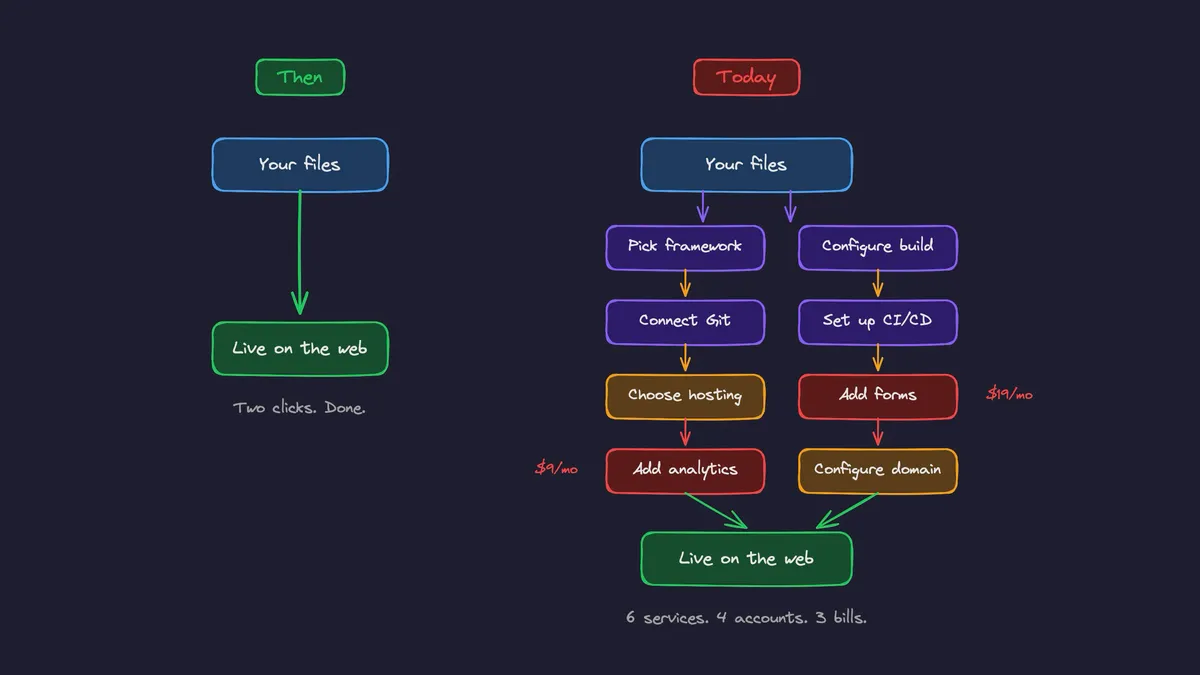
I published my first website at 12 years old. Uploaded HTML files to a shared hosting service with a 5MB limit. File upload, get URL. Two clicks and done.
That was over 20 years ago. Since then, the underlying technology has gotten exponentially better. Global CDNs, edge networks, automatic SSL, instant propagation. The infrastructure is incredible.
But the experience of putting a simple site online got worse.
Today, deploying a basic website means choosing a framework, configuring a build pipeline, connecting a Git repository, setting up CI/CD, picking a hosting provider, then adding separate services for forms and analytics. Each with its own account, dashboard, and billing.
We added preview deploys, serverless functions, and edge compute. These are genuinely useful capabilities for complex applications. But somewhere along the way, we forgot to keep a simple path available for simple projects. The on-ramp disappeared.
The framework trap
Here’s what happened: the tooling got so good at solving hard problems that we started using it for easy ones too.
Next.js is the most popular React framework. It has the best tutorials, the largest community, and the most content. So when a developer needs to build a marketing site with five pages, a hero section, and a contact form, they reach for Next.js. Not because they evaluated their requirements and concluded they need server-side rendering. Because it’s the default.
And now LLMs are reinforcing this. Ask ChatGPT to build you a website right now. You’ll get Next.js. Deploy it to Vercel, the default suggestion, and you’re running SSR infrastructure, build queues, serverless functions, and edge middleware for what could have been three static HTML files.
The framework creates the infrastructure dependency. The infrastructure creates the cost. And the person never made a conscious choice about any of it. That’s the real price of defaults. Not money, but agency.
This isn’t theoretical. A developer recently shared a $46,000 Vercel bill for a site with 450 million pageviews, even after aggressive cache mitigation. The site had enough traffic to justify optimizing, and they still couldn’t make the economics work. Serving that same content as static files from a CDN would cost a fraction of that. The expensive part wasn’t the traffic. It was the infrastructure sitting between the files and the users.
A framework like Astro would be a better fit for most of these sites. ZeroDeploy’s own marketing website is built on Astro. Our dashboard is React + Vite. Both produce static files. Both deploy in under five seconds.
90% of sites should be static
I’ll split websites into three categories:
-
Pure static sites: Marketing pages, documentation, portfolios, landing pages, and blogs. Content that doesn’t change between requests. These can be generated at build time and served from a CDN. 100% static.
-
Apps behind a login: Dashboards, admin panels, and internal tools. These are single-page applications that connect to backend APIs. The frontend is still static files: HTML, CSS, and JavaScript. The dynamic part is the API, which runs separately. 100% static frontend.
-
Public sites with dynamic data that need SEO: Think Shopify, marketplaces, and social platforms. Content changes frequently and needs to be indexed by search engines with fresh data. These genuinely need server-side rendering.
Categories 1 and 2 cover the vast majority of what gets built. And both are just static files served from a CDN.
Serving static files is cheap. A $5 VPS with nginx and proper caching headers handles more traffic than most sites will ever see. Put a CDN in front, such as Cloudflare’s, and it scales to millions of requests. Static sites don’t have surprise bills because serving cached files from edge nodes costs almost nothing.
Why static sites are more reliable
This isn’t just about simplicity at deploy time. It’s about what happens after.
A static site, once deployed, just sits there working. There’s no server process to crash at 3 AM. No runtime errors. No security patches for a Node.js process you’re running just to render HTML. No memory leaks. No cold starts.
I chose to build statically so I could sleep well at night. The only critical piece of software I need to worry about is the API backend. Everything else, including the marketing site, dashboard, and admin panel, is always available, always fast, and maintenance-free.
Static sites have been working since the first website went online in 1991. Every architectural trend has come and gone, and static is still here. That’s not a limitation. It’s a track record. Fewer moving parts, fewer things that can go wrong, forever.
The honest concession
If you’re building a full-stack application with a tightly coupled backend and frontend, or server-side logic on every request, then Vercel is a great choice. If you’re running an e-commerce store or building a marketplace with constantly changing inventory and SEO requirements, you need SSR. Use the right tool.
But be intentional about it. Know which pages need server rendering and which don’t. Don’t default to the complex stack because it’s what the tutorial used.
What I did about it
I built ZeroDeploy to get back to what worked when I was 12. Upload your files, get a URL.
Forms and analytics are included on every plan, not as separate paid add-ons, because every website needs them and no one should have to manage three services for a portfolio site. Custom domains, password protection, preview URLs. One platform, one dashboard, one bill.
That’s where the name came from. Zero friction. The complexity is there if you need it: CLI deploys, GitHub CI/CD, and API tokens for automation. But the simple path never disappears. Drag and drop a folder. Get a URL. Done. Get started in 30 seconds.
I put off building my personal website for years because adding a contact form meant signing up for another service. That’s the problem. And I doubt I’m the only one. How many side projects are sitting on your hard drive right now because the deployment part felt like too much?
Putting a basic site online should be the easiest thing a developer does. Not something you abandon because the tooling got in the way.